From First Lead to Active Project — One Connected Workflow
FieldMetriq links lead capture, job walk, estimate, proposal, approval, deposit, and project activation into one operational path so the team can move work forward without dropped handoffs.
Contractor businesses lose control when each stage of the job lives in a different tool or thread.
The lead-to-project path breaks down when sales data, estimate details, proposal status, deposit confirmation, and kickoff context are all owned in separate places. That is where jobs stall, details get lost, and teams start with incomplete information.
A contractor workflow that explains what happens at each handoff point.
Each step reflects what the contractor is doing, what FieldMetriq is organizing, and why that step matters to the next one.
Lead captured
The contractor logs the inquiry, while FieldMetriq keeps contact, opportunity context, and next action visible so the job does not disappear before scoping begins.
Job walk scheduled
The team moves the lead into real field scoping work, and FieldMetriq keeps that transition visible so site access, timing, and responsibility are clear.
Scope documented
Scope details and job-walk notes get attached to the live opportunity, which matters because estimating and proposal work need a reliable starting point.
Estimate prepared
The office or estimator turns the scope into pricing, while FieldMetriq keeps the estimate attached to the same workflow instead of spinning it into a disconnected admin task.
Proposal sent
The client-facing proposal goes out, and FieldMetriq treats that as a visible operational state so the team knows the job is awaiting decision.
Client approval confirmed
The contractor confirms the job is sold, while FieldMetriq makes approval explicit so the next handoff is not dependent on memory or side conversation.
Deposit received
The office verifies financial readiness, and FieldMetriq keeps that deposit state inside the same workflow because kickoff should depend on real readiness.
Project activated
The sold job becomes a live project record with source context still attached, which matters because execution should begin from the actual approved record.
Team aligned for execution
PM, office, and field teams work from the same operational context so the kickoff starts with fewer blind spots and less reconstruction.
The clearest way to see the workflow is as one uninterrupted operating path.
This diagram is the canonical visual summary for how FieldMetriq moves a contractor from inquiry to active job.
Lead
Inquiry captured and owned.
Job Walk
Field scoping begins.
Estimate
Pricing and scope align.
Proposal
Client decision point.
Deposit
Readiness confirmed.
Project
Activation and kickoff.
The workflow stays connected because the critical systems are not drifting apart.
Sales intake visibility
Keep new opportunities visible with stage, notes, and next action instead of letting intake context disappear before the job walk.
View homepageJob walk and scope clarity
Carry site context and scope notes forward so the estimator and office are not rebuilding the field story from scratch.
Proposal and approval tracking
Make proposal state and client decision visible enough that the whole team can see whether the job is pending, sold, or blocked.
View sales-to-work handoffDeposit and activation readiness
Treat deposit confirmation as part of the operational handoff instead of a disconnected billing note.
Project visibility after handoff
Start execution from a live project record that still knows where it came from and what the client approved.
Reduced admin drag between office and field
Give the team one operating path so status chasing and duplicate entry go down as the job moves forward.
View remodel contractor pageThe workflow only works if the team can see the current state in one place.
This structured placeholder panel shows how a real operating screen can combine intake, handoff, and project-readiness context without forcing the team into disconnected tools.
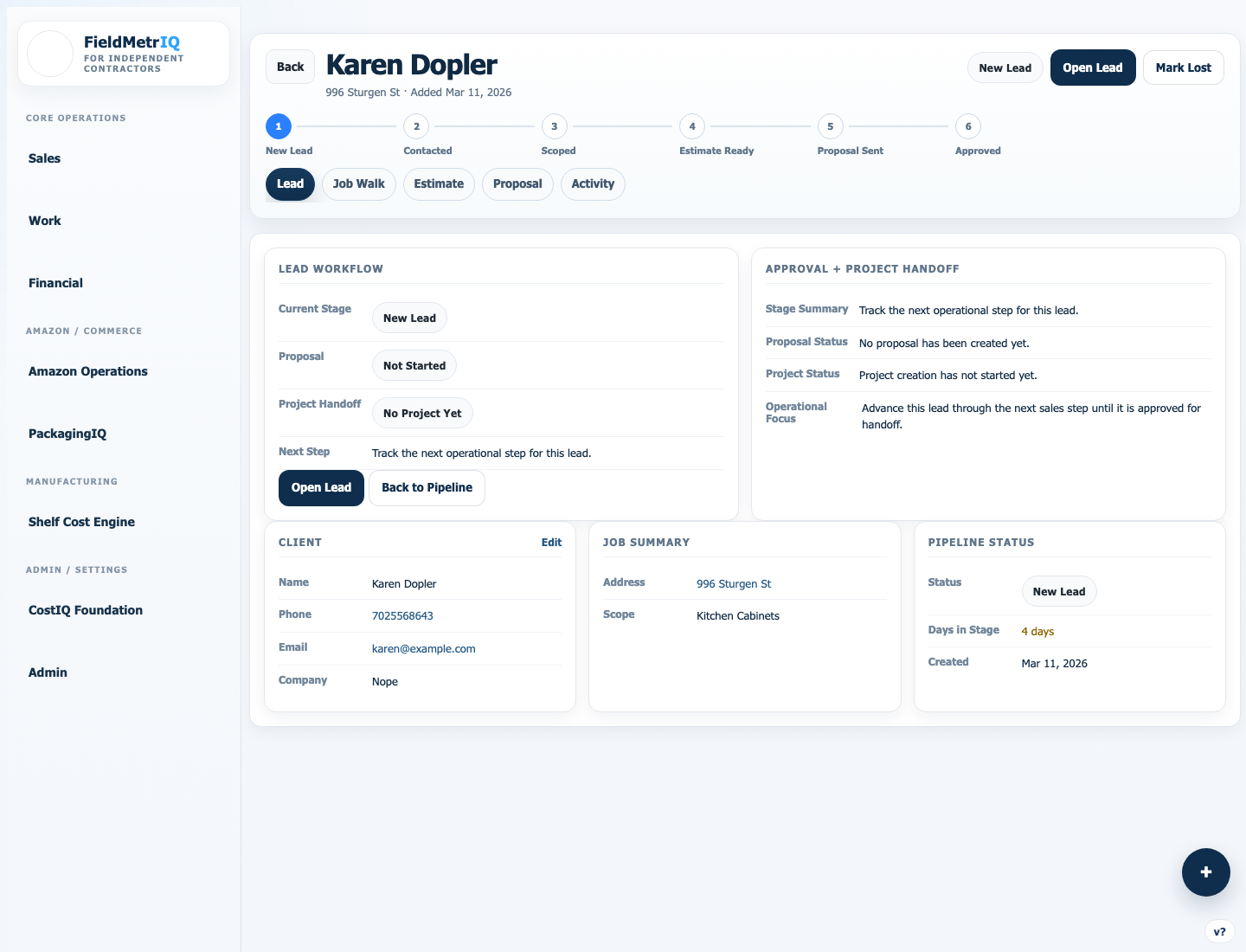
This page is designed to make the operating path feel concrete, not theoretical.
Full journey
The diagram and step sequence cover the entire lead-to-project path, not just one feature.
One job story
The visual panel emphasizes a single record carrying the handoff forward.
Real operations
The workflow language is grounded in job walks, estimates, approvals, deposits, and kickoff.
The operational difference is whether the job moves through one system or gets rebuilt at every phase.
Broken Workflow
Lead details start in one place and get partially re-entered later, which creates missing context from day one.
FieldMetriq Workflow
Lead data stays attached to the workflow so early context is still available when the job is sold.
Broken Workflow
Estimate progress depends on message chasing, spreadsheets, and memory about what the job walk actually covered.
FieldMetriq Workflow
Estimate work stays tied to the live opportunity, so the team sees what has moved forward and what still needs action.
Broken Workflow
Nobody has one clean view of whether the proposal is out, revised, pending, or effectively dead.
FieldMetriq Workflow
Proposal status is visible enough for the office and operators to know what handoff state the job is in.
Broken Workflow
Approval gets confirmed informally, leaving uncertainty around who should act next and when.
FieldMetriq Workflow
Approval becomes a visible operational state that can drive the next project-readiness step.
Broken Workflow
Deposit information lives in side channels and often fails to change the actual kickoff workflow.
FieldMetriq Workflow
Deposit readiness sits inside the same workflow so activation reflects the real job state.
Broken Workflow
The project starts with missing notes, partial scope context, or late setup because the handoff happened too loosely.
FieldMetriq Workflow
Kickoff starts from a more complete project record with clearer source context and readiness signals.
Broken Workflow
Sales, admin, and field each know part of the story but not the full current picture.
FieldMetriq Workflow
The team can work from one workflow that explains current state, blocker, and next action.
This workflow is built for contractor teams that need cleaner handoffs, not just more software.
Remodel contractors
Best fit for kitchen, bath, cabinet, and interior renovation work where the sales-to-project path is long enough to break down without structure.
Owner-operators
Useful for businesses where the same people are selling, scoping, and kicking off work and need clearer process continuity.
Teams with split responsibilities
Helpful when sales, estimating, office admin, PM, and field execution are shared across different people.
Growing contractors standardizing process
A strong fit for teams trying to move beyond spreadsheets, whiteboards, and text-thread coordination.
Common questions about the lead-to-project workflow.
Is this workflow only for remodel contractors?
That is the strongest current fit, but the workflow also suits contractor teams that need a clearer bridge from lead, estimate, and proposal work into real project execution.
Can I use this if my sales process is informal today?
Yes. FieldMetriq is useful precisely when the current process is living in notes, texts, and memory and the team needs a more structured handoff path.
Does FieldMetriq support the handoff after client approval?
Yes. One of the main strengths is turning approval, deposit readiness, and project activation into a connected operational sequence.
Can this replace spreadsheets and text-thread follow-up?
That is the goal. The workflow is designed to reduce side-system coordination and keep the job moving in one operating path.
Is this useful even if my team is small?
Yes. Smaller teams often feel handoff failures most because the same people are switching hats constantly and need cleaner process visibility.
Turn inquiry, approval, and kickoff into one connected contractor workflow.
Use FieldMetriq to move the job from first lead to active project without the usual handoff gaps between sales, admin, and execution.